
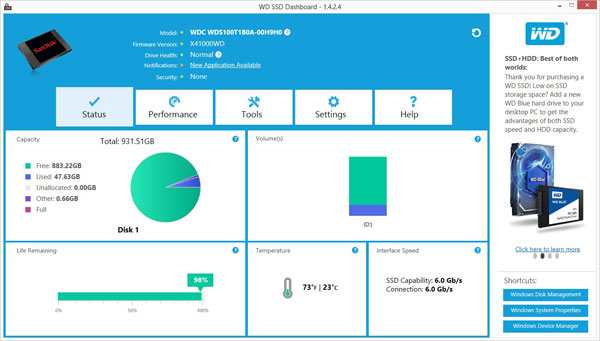
Western Digital SSD Dashboard Driver 3.8.2.9
Driver package for Windows 7, 8.1, 10, 32-bit & 64-bit. Released Jan 29, 2023.
- Manufacturer
- Western Digital
- Version
- 3.8.2.9
- Release date
- Jan 29, 2023
- Windows
- Windows 7Windows 8.1Windows 10
- Architecture
- 32-bit & 64-bit
- Size
- 4 MB
- Category
- SSD and storage › Western Digital
Download
WDDashboardSetup.exe
Description
Supported WD SSD disk:
- WD Blue 3D NAND SATA SSD 2.5" 250 Go (WDS250G2B0A)
- WD Blue 3D NAND SATA SSD 2.5" 500 Go (WDS500G2B0A)
- WD Blue 3D NAND SATA SSD 2.5" 1 To (WDS100T2B0A)
- WD Blue 3D NAND SATA SSD 2.5" 2 To (WDS200T2B0A)
- WD Blue 3D NAND SATA SSD 2.5" 4 To (WDS400T2B0A)
- WD Blue 3D NAND SATA SSD M.2 250 Go (WDS250G2B0B)
- WD Blue 3D NAND SATA SSD M.2 500 Go (WDS500G2B0B)
- WD Blue 3D NAND SATA SSD M.2 1 To (WDS100T2B0B)
- WD Blue 3D NAND SATA SSD M.2 2 To (WDS200T2B0B)
- WD Blue PC SSD 2.5" 250 Go (WDS250G1B0A)
- WD Blue PC SSD 2.5" 500 Go (WDS500G1B0A)
- WD Blue PC SSD 2.5" 1 To (WDS100T1B0A)
- WD Blue PC SSD M.2 500 Go (WDS250G1B0B)
- WD Blue PC SSD M.2 500 Go (WDS500G1B0B)
- WD Blue PC SSD M.2 1 To (WDS100T1B0B)
- WD Blue SN500 NVMe SSD 250 Go (WDS250G1B0C)
- WD Blue SN500 NVMe SSD 500 Go (WDS500G1B0C)
- WD Blue SN550 NVMe SSD 250 Go (WDS250G2B0C)
- WD Blue SN550 NVMe SSD 500 Go (WDS500G2B0C)
- WD Blue SN550 NVMe SSD 1 To (WDS100T2B0C)
- WD Blue SN570 NVMe SSD 250 Go (WDS250G3B0C)
- WD Blue SN570 NVMe SSD 500 Go (WDS500G3B0C)
- WD Blue SN570 NVMe SSD 1 To (WDS100T3B0C)
- WD Black NVMe SSD 250 Go (WDS250G2X0C)
- WD Black NVMe SSD 500 Go (WDS500G2X0C)
- WD Black NVMe SSD 1 To (WDS100T2X0C)
- WD Black PCIe SSD 256 Go (WDS256G1X0C)
- WD Black PCIe SSD 512 Go (WDS512G1X0C)
- WD_BLACK AN1500 NVMe SSD Add-in-Card 1 To (WDS100T1X0L)
- WD_BLACK AN1500 NVMe SSD Add-in-Card 2 To (WDS200T1X0L)
- WD_BLACK AN1500 NVMe SSD Add-in-Card 4 To (WDS400T1X0L)
- WD_BLACK D10 Game Drive 8 To (WDBA3P0080HBK)
- WD_BLACK D30 Game Drive SSD 500 Go (WDBATL5000ABK)
- WD_BLACK D30 Game Drive SSD 1 To (WDBATL0010BBK)
- WD_BLACK D30 Game Drive SSD 2 To (WDBATL0020BBK)
- WD_BLACK D30 Game Drive SSD for Xbox 500 Go (WDBAMF5000ABW)
- WD_BLACK D30 Game Drive SSD for Xbox 1 To (WDBAMF0010BBW)
- WD_BLACK D30 Game Drive SSD for Xbox 2 To (WDBAMF0020BBW)
- WD_BLACK D50 Game Dock (WDBA3U0000NBK)
- WD_BLACK D50 Game Dock NVMe SSD 1 To (WDBA3U0010BBK)
- WD_BLACK D50 Game Dock NVMe SSD 2 To (WDBA3U0020BBK)
- WD_BLACK P10 Game Drive 2 To (WDBA2W0020BBK)
- WD_BLACK P10 Game Drive 4 To (WDBA3A0040BBK)
- WD_BLACK P10 Game Drive 5 To (WDBA3A0050BBK)
- WD_BLACK P10 Game Drive Call of Duty Edition 2 To (WDBAZC0020BBK)
- WD_BLACK P50 Game Drive SSD 500 Go (WDBA3S5000ABK)
- WD_BLACK P50 Game Drive SSD 1 To (WDBA3S0010BBK)
- WD_BLACK P50 Game Drive SSD 2 To (WDBA3S0020BBK)
- WD_BLACK P50 Game Drive SSD Call of Duty Edition 1 To (WDBAZX0010BBK)
- WD_BLACK SN750 NVMe SSD with heatsink 500 Go (WDS500G3XHC)
- WD_BLACK SN750 NVMe SSD with heatsink 1 To (WDS100T3XHC)
- WD_BLACK SN750 NVMe SSD with heatsink 2 To (WDS200T3XHC)
- WD_BLACK SN750 NVMe SSD without heatsink 250 Go (WDS250G3X0C)
- WD_BLACK SN750 NVMe SSD without heatsink 500 Go (WDS500G3X0C)
- WD_BLACK SN750 NVMe SSD without heatsink 1 To (WDS100T3X0C)
- WD_BLACK SN750 NVMe SSD without heatsink 2 To (WDS200T3X0C)
- WD_BLACK SN750 SE NVMe SSD 250 Go (WDS250G1B0E)
- WD_BLACK SN750 SE NVMe SSD 500 Go (WDS500G1B0E)
- WD_BLACK SN750 SE NVMe SSD 1 To (WDS100T1B0E)
- WD_BLACK SN850 NVMe SSD with heatsink 500 Go (WDS500G1XHE)
- WD_BLACK SN850 NVMe SSD with heatsink 1 To (WDS100T1XHE)
- WD_BLACK SN850 NVMe SSD with heatsink 2 To (WDS200T1XHE)
- WD_BLACK SN850 NVMe SSD without heatsink 500 Go (WDS500G1X0E)
- WD_BLACK SN850 NVMe SSD without heatsink 1 To (WDS100T1X0E)
- WD_BLACK SN850 NVMe SSD without heatsink 2 To (WDS200T1X0E)
- WD_BLACK SN850 NVMe SSD Call of Duty Edition 1 To (WDBB2F0010BNC)
- WD Gold Enterprise Class NVMe SSD 960 Go (WDS960G1D0D)
- WD Gold Enterprise Class NVMe SSD 1,92 To (WDS192T1D0D)
- WD Gold Enterprise Class NVMe SSD 3,84 To (WDS384T1D0D)
- WD Gold Enterprise Class NVMe SSD 7,68 To (WDS768T1D0D)
- WD Green PC SSD 2.5" 120 Go (WDS120G1G0A)
- WD Green PC SSD 2.5" 240 Go (WDS240G1G0A)
- WD Green PC SSD 2.5" 480 Go (WDS480G1G0A)
- WD Green PC SSD 2.5" 1 To (WDS100T2G0A)
- WD Green PC SSD 2.5" 1 To (WDS200T2G0A)
- WD Green PC SSD M.2 120 Go (WDS120G1G0B)
- WD Green PC SSD M.2 240 Go (WDS240G1G0B)
- WD Green PC SSD M.2 480 Go (WDS480G1G0B)
- WD Green SN350 NVMe SSD 240 Go (WDS240G2G0C)
- WD Green SN350 NVMe SSD 480 Go (WDS480G2G0C)
- WD Green SN350 NVMe SSD 960 Go (WDS960G2G0C)
- WD Red SA500 NAS SATA SSD 2.5"/7mm cased 500 Go (WDS500G1R0A)
- WD Red SA500 NAS SATA SSD 2.5"/7mm cased 1 To (WDS100T1R0A)
- WD Red SA500 NAS SATA SSD 2.5"/7mm cased 2 To (WDS200T1R0A)
- WD Red SA500 NAS SATA SSD 2.5"/7mm cased 4 To (WDS400T1R0A)
- WD Red SA500 NAS SATA SSD M.2 2280 500 Go (WDS500G1R0B)
- WD Red SA500 NAS SATA SSD M.2 2280 1 To (WDS100T1R0B)
- WD Red SA500 NAS SATA SSD M.2 2280 2 To (WDS200T1R0B)
How to install
- Check that this is the right driver. Open Device Manager (right-click the Start button), right-click your device, choose Properties and look at "Hardware Ids" on the Details tab. The value should match one of the supported IDs below (more about hardware IDs).
- Run the downloaded
.exefile as administrator and follow the setup wizard. - Restart the computer and check that the device no longer shows a yellow warning sign in Device Manager.
Windows 11 is not listed by the manufacturer, but drivers made for 64-bit Windows 10 usually work on Windows 11 as well.
Other drivers for this hardware
| Driver | Version | Date | Windows |
|---|---|---|---|
| Western Digital SSD Dashboard Driver | 4.0.2.19 | Aug 3, 2023 | Windows 10, 11 |
| Western Digital SSD Dashboard Driver | 3.8.2.10 | Feb 1, 2023 | Windows 10, 11 |